Authentication is not authorization: how Safe Pro separates access from signing
Safe Pro adds a login, Workspace roles, and step-up authentication for shared data. Signing rights stay with each Safe’s owners and onchain rules.
Greg Jeanmart, Safe Labs • 18 November 2026
In Safe Pro, the Workspace is the account
For years, the Safe was the unit. You opened one and that was your entire context: this contract, these owners, this balance. A team running 15 Safes across five chains had 15 contexts and no account.
Safe Pro makes the Workspace the account. The Workspace now owns the members, the roles, the linked Safes, the shared address book, and the activity log. Your Safes stay exactly what they always were, multisig contracts governed by their owners and their thresholds.
But with Workspace, you can now extend who participates without changing who holds the keys. Your CFO signs in with an email to a Workspace and sees the whole treasury. Your compliance reviewer joins as a Member and follows the same balances, queue, and activity log. Neither of them holds a key. Neither of them can move a cent.
Safe Pro is a paid product. Safe{Wallet} stays free.
Workspace is available in all Safe Pro plans. If a Pro subscription ends, your Workspace locks. All related Safes remain yours and accessible outside the Workspace, and signing rights keep working exactly as they did before.
We've made this work by keeping two questions apart:
Authentication proves who you are.
Authorization decides what you're allowed to do.
Your Workspace role decides what actions you can perform, and the Safe's onchain rules decide whether a transaction can execute. Signing into a Workspace does not confer signing rights.
Safe now has a login
For most of its life, Safe{Wallet} had no login, and the free app still doesn't need one. You open a Safe, the app loads it. Anyone can look at any Safe. Your keys are the gate to transacting, and that model has held for years.
Safe Pro builds two things on top of it: a session and an account.
A session lets Safe’s infrastructure recognize who is making a request. Safe can then serve and protect resource-heavy endpoints based on who is calling them, instead of treating every request on the internet the same way.
An account gives teams one place to work. Teams now run many Safes across many chains, often with different signers on each one. Workspace brings that context together with a shared address book, a member list, and the Security Hub. Teams needed more from the interface than a single Safe could give them, and that’s why Safe built Safe Pro.
Two permission systems
Workspace runs role-based access control over your data. Every member holds one of two roles:
An Admin manages the Workspace: invites and removes members, changes roles, adds and removes Safes, edits the shared address book, configures settings and the plan.
A Member operates day to day: sees every linked Safe, balance, and pending transaction, prepares transactions for signers to approve, and uses the shared address book without editing it.
No Workspace role grants signing or execution authority over a Safe. This includes Admins and the creators of the Workspace. A Member can prepare a transaction, only the Safe's owners can approve it.
What Workspace gives you is a space to organize the people and the context around those Safes.
Policies are exclusive to the Business and Enterprise plans. These sit outside the Workspace roles too, and they're two different kinds of control. A spending limit lets a designated address spend a set amount of one token, enforced onchain by the open-source Allowance Module. A proposer is managed offchain: a signer grants it with a signature, and it lets someone prepare transactions for the Safe's signers to approve. Neither comes directly from a Workspace role.
Three tiers of proof
Reading a balance, editing the contact list that determines where money goes, and moving the money are three different risks. They get three different levels of proof.
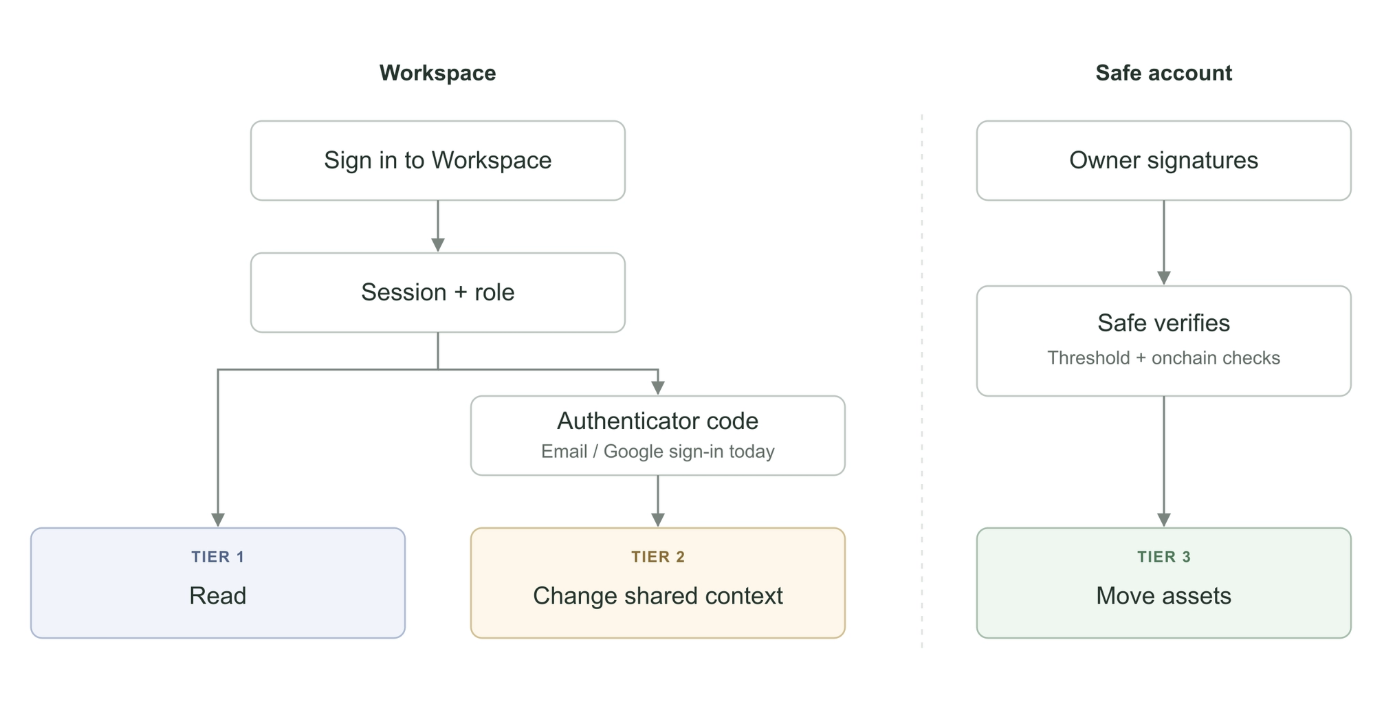 Different actions need different proof. Workspace roles govern shared data, with an authenticator step-up currently covering email and Google sign-ins. The Safe enforces transaction authorization on its own.
Tier 1: reading
To browse your Safes, check the queue, or review your Security Hub, you only need to sign in.
Tier 2: writing to the shared context
If you want to add or edit a contact, approve a contact request, invite a member, change a role, add or remove a Safe, you need to sign in as an Admin and step up with a time-based one-time code (TOTP) from an authenticator app.
Two-factor authentication at login only protects the moment you log in. Infostealers steal sessions that are already authenticated. Step-up authentication asks for a fresh code when the change is requested, so a stolen session can’t make it. This is why for you'll now be asked to enter a TOTP again to ensure it's you who's requesting a change for the above actions inside a Workspace.
Today step-up authentication covers accounts that sign in with email or Google. Wallet sign-in doesn't have 2FA yet, and that's a gap we're working on. Authenticator codes aren't the end state either: like any code you type, they can be phished. Passkeys are the natural next step.
Tier 3: moving assets
In the normal Safe transaction flow, owners approve with their signing keys, and the transaction executes only once enough of them have signed to meet the Safe's threshold and its onchain checks pass. Spending limits are the deliberate exception: a separate, bounded path the owners authorized in advance.
Since 21 October 2026, Safe Pro adds a security check at this tier on Ethereum mainnet, Arbitrum, and Gnosis Chain. Safenet, a security network governed by Safe{DAO}, as independent security firms check supported transactions against the Safenet Charter, and a validator network attests to the result onchain. oday the attestation informs signers. It doesn’t replace the Safe’s authorization rules. Safenet Guard, which enforces it onchain, will be optional in Safe Pro.
Different locks for different doors
The point of all this isn't fewer signatures for their own sake. It's that access technologies have different properties, and a serious system assigns the right one per job instead of applying its heaviest control everywhere.
A hardware wallet is the right tool for authorizing value. It's also miserable as a daily login, which is the real substance behind the complaint that Sign-In With Ethereum trains people to sign without reading. For web sessions, we therefore think it makes more sense to use familiar Web2 tools: two-factor authentication, Google or email login, and step-up authentication.
It's a change in habits, and there are iterations ahead. But we think the goal is worth the friction: stronger protection for our users, sturdier infrastructure underneath, and fewer signatures that mean more.
Workspace is included in every Safe Pro plan. Compare plans or start a 30-day free trial of Starter or Business, no card required.
This article was written by Greg Jeanmart and edited by Tim Daubenschütz
Greg Jeanmart, Safe Labs • 18 November 2026

